All chapters
Start with Chapbook
Create an account, bring your paragraph with you, and learn the shortest path from idea to something you can read.
What Chapbook makes
Chapbook turns a short brief into an outline, editable chapters, a designed interior, a cover, and files you can take elsewhere. The finished downloads are a digital PDF, an EPUB 3 file, a Word document (DOCX), and a 1600 × 2560 cover JPEG.
You approve the plan and can edit every word. AI output can be inaccurate, so checking facts, rights, and the final manuscript remains your responsibility.
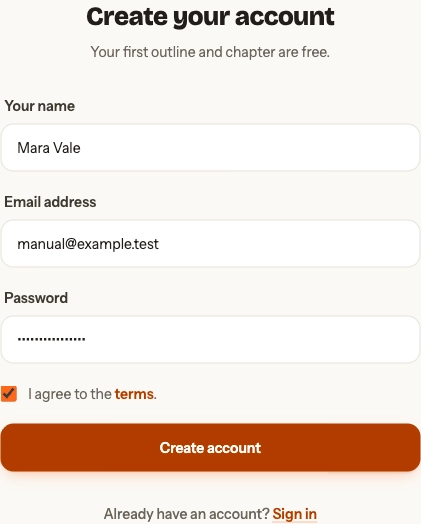
Create your account
Start with your name, email, a password of at least eight characters, and agreement to the terms. Google sign-in also appears when it is enabled. After email sign-up, open the verification message Chapbook sends before continuing.
Already have an account? Sign in with your password or choose Email me a sign-in link. Forgot password? sends a reset link. A brief begun on the landing site survives the sign-up redirect, so you do not need to type it again.
What you can do free
You can judge the plan and the writing before deciding whether to subscribe. The Free plan includes one project, a complete editable outline, the opening of the book drafted with one redo of chapter one (a short book is drafted whole), one batch of cover candidates, every look, and watermarked PDF and cover previews. The pricing page gives the number of words the free plan drafts.
Paid actions show their Book Credit estimate before work starts. See current plans and prices when you are ready for the full manuscript or clean files.
The shortest route through the app
Brief → outline → sample → manuscript → look and cover → launch or publish.
Start with a new book, learn how to write and edit, choose the look and cover, then finish and export.