All chapters
Plan with the assistant
Use one continuing conversation to sharpen the brief, shape the outline, and decide when writing begins.
Answer what is still missing
The assistant reads the brief and asks only for decisions it still needs. Use a suggested quick reply or write an ordinary message. Enter sends; Shift-Enter adds a new line.
The same conversation follows the book between Overview, Manuscript, Notes, Look, Launch, and Publish, so “this chapter” and “this cover” keep their context.
Read and change the outline
Ask for fewer chapters, a different order, or a stronger promise before you start the draft. The outline card shows which chapters are planned and which are already written. You can also choose I’ll write it myself to move to the manuscript and write the book in your own words.
Approve the sample
When chapter one lands, read it in the Manuscript before asking for the rest. Return to the conversation to describe a voice change or structural correction. When the sample is right, choose Write the rest.
Use the Overview
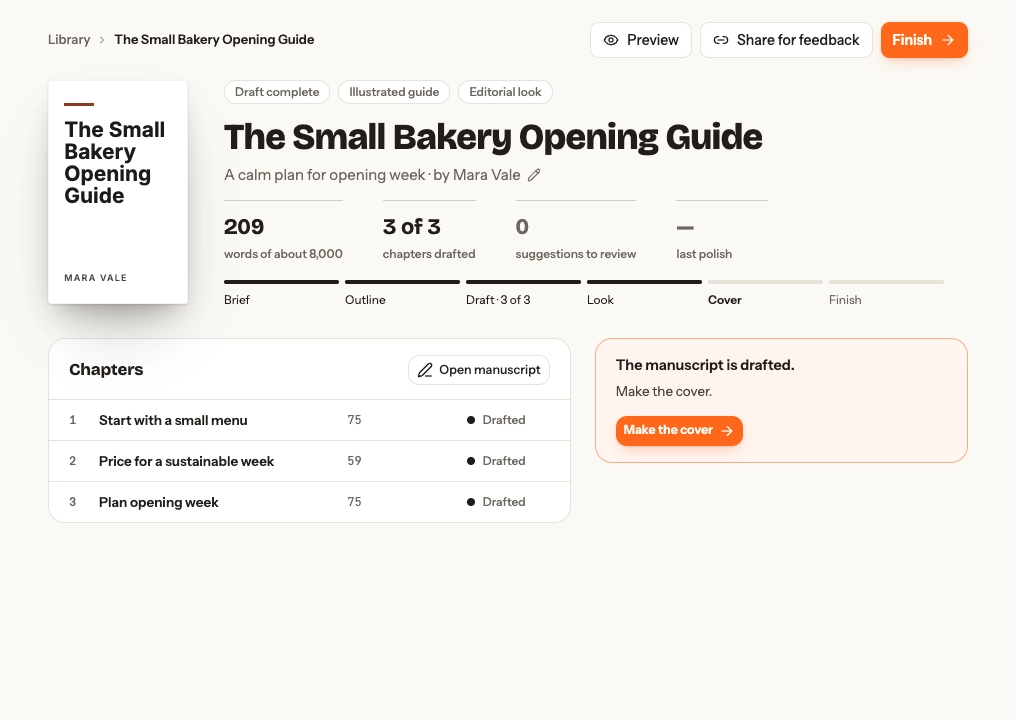
After writing starts, Overview becomes the book’s status page. It shows the cover, editable title and details (the book’s language among them), words, drafted chapters, suggestions awaiting review, the last polish, stage track, and chapter list.
From here you can Preview, Share for feedback, Finish, or follow the recommended next action. Previewing does not publish the book.