All chapters
Finish, export, and launch elsewhere
Run the final checks, download your files, and prepare copy, emails, posts, and carousels for the places where you will release the book.
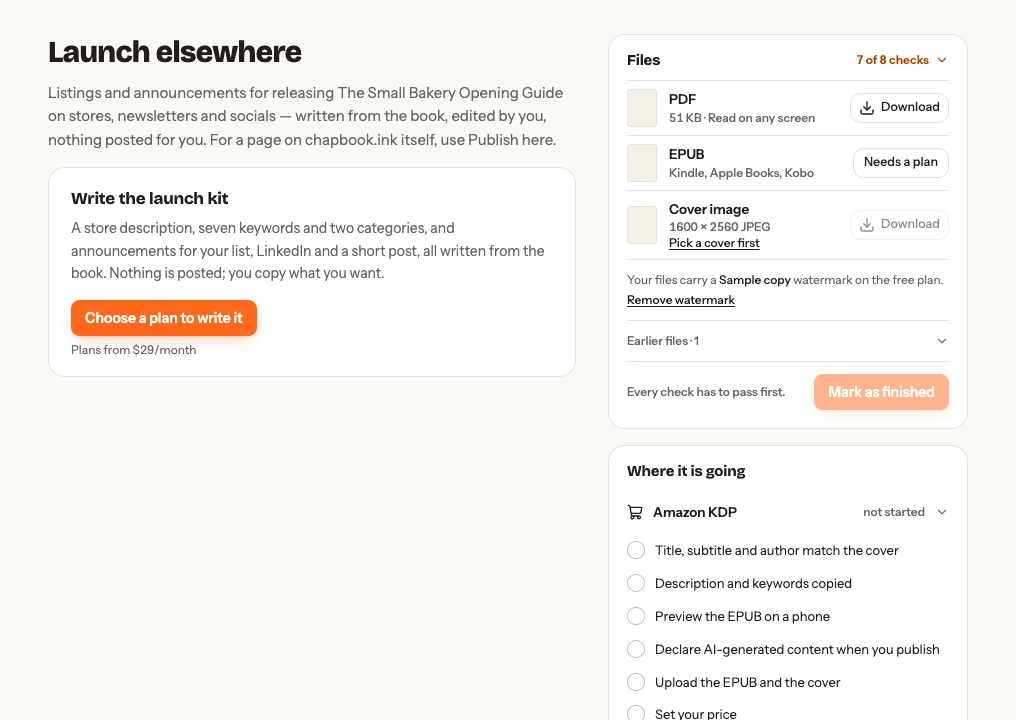
Open Launch elsewhere
Finish from the manuscript or Overview to put files, launch copy, and venue checklists in one place.
Check the book
Open the checks count, fix failed items, and download the checks report when you need the detail. You can mark the book Finished only when its required checks pass. Reopen it later if more work is needed.
End on a next step
A lead magnet, workbook, brochure, or activity pack ends on a Next step page unless you turn it off; other kinds of book can add one. Under Next step page, give the link readers should open, the button’s words, and the sentence above it. The page is printed only once there is a link, and only links that start with http:// or https:// are accepted. It closes the PDF, EPUB, and Word document with a button and the address; the PDF adds a QR code for printed copies.
The link gets utm_source=chapbook, utm_medium=book, and utm_campaign set to the book’s title, so your analytics can count readers who came from the book. Your own utm_ values are kept. Turn off Track clicks in your analytics for a plain link. You can also ask the assistant to set the link.
Download your files
Choose Download for PDF, EPUB, Word document, or Cover image; Chapbook builds a current file before the browser saves it. PDF is for reading on any screen. EPUB works with Kindle, Apple Books, and Kobo. The Word document (DOCX) opens in Word, Google Docs, or LibreOffice, for an editor or for finishing touches: it keeps the book’s fonts, heading colours, page size, cover, and pictures. The cover is a 1600 × 2560 JPEG. Every file is in the book’s language: its hyphenation and quotation marks, and the contents, copyright, and next step pages Chapbook adds. An activity pack is pages to print, so it has the PDF and the cover only: no EPUB or Word document.
The Free plan provides a watermarked PDF, paperback interior and cover, Word document, and cover image; the Word document carries a “Sample copy” line at the top of every page. EPUB and new clean files need a paid plan, or the book’s Book Pass. Earlier files remain listed, and files already created remain downloadable after cancellation. See current plans and prices.
Make a paperback interior
A nonfiction book, workbook, or guide also has a Paperback interior row: a PDF sized for an Amazon KDP paperback. Pick the trim, 6 × 9, 5.5 × 8.5, 7 × 10, or 8.5 × 11 inches, and choose Download. The interior has no cover page, because KDP takes the cover as a file of its own. Chapters open on a right-hand page, with a blank page before one when needed, and the inside margin widens as the book gets longer, as KDP asks. Turn on Bleed when your look’s page art should run off the edge of the page; it adds 0.125 inches past the trim on the top, bottom, and outside edges. The pages print on the paper you choose at KDP, so the look’s paper colour is left off, and a text colour too light for white paper turns dark.
Every paperback interior comes with a preflight report under its row: the trim, the margins beside KDP’s minimums, each picture’s resolution at its printed size, the fonts, and the page count. Each problem names its page, such as a picture below 300 DPI or text that runs into a margin. Under 24 pages the file is a draft, since KDP prints paperbacks from 24 pages; past 500 pages Chapbook does not make one. The file is KDP-sized, not KDP-approved: open it in KDP’s previewer and order a printed proof before you publish.
Make the paperback cover
Below the interior, the Paperback cover row makes the cover KDP prints round the book: back, spine, and front in one PDF, with 0.125 inches of bleed on every side. It wraps the interior at the trim and bleed chosen above, and its spine is as wide as that interior’s page count on the ink and paper you pick here, which must match what you choose on KDP: black and white on white or cream paper, standard colour, or premium colour. Pick a cover on the Look page first.
The front is your book’s cover, the same picture and lettering, set to the trim’s shape. The back carries the book’s description from the launch kit and the bio from your author profile, set smaller when they are long; keep them short enough to fit. The lower right corner of the back, by the spine, stays empty, because KDP prints the barcode there. The spine carries the title and your name only on books of more than 79 pages, and only when it is wide enough for 7 pt type.
The cover’s preflight report gives its size, the spine’s width and why it is blank when it is, the picture’s resolution as printed, and the fonts, and names any problem: text in the barcode area, a back too long to fit, or a picture below 300 DPI. Like the interior, it is KDP-sized, not KDP-approved. The free spine and cover template calculator works out the same sizes for any page count.
Write the launch kit
Generate a store description, seven keywords, three categories, and copy for email, LinkedIn, and a short post. Every field remains editable; use Shorter, Punchier, More specific, or Copy as needed. Chapbook does not post anything for you.
Write the launch campaign
Open the Campaign tab for what you send and post around the book: a five-email welcome sequence for your own email tool, ten posts (five for LinkedIn, five short ones for X, Threads, or Bluesky), and a carousel of six to ten slides for each of the first 12 chapters, set in the book’s fonts and colours. It needs a paid plan and shows its credit price before it runs; a book with more chapters is told which ones get no carousel.
Paste the emails into your email tool’s welcome automation, one a few days apart: the first delivers the book, the next three teach one lesson each, and the last points to the book’s next step. Copy each post as it is. Download a chapter’s carousel as a PDF for a LinkedIn document post, or as PNGs for Instagram.
Links in the emails and posts open the book’s page on Chapbook once you publish it; until then they read “[link to your book]”. Each kind of link is tagged, so the page’s numbers show whether readers came from the emails, the posts, or the carousels. The last email links to your next step page’s link instead. A carousel’s final slide links to the page if it was published before you wrote the campaign. Chapbook sends nothing and posts nothing for you. Write the campaign again after you change the book or its look.
Copy the KDP listing
Open the KDP listing tab to see the kit in the order of Amazon KDP’s eBook details form: language, title, subtitle, series, edition, author, description, publishing rights, keywords, categories, audience, and AI content. Copy each field into KDP as you go. The description is HTML: click Source above KDP’s description box before you paste it. To change its formatting, choose Edit HTML; KDP accepts only a short list of tags, and Chapbook tells you if anything would be refused.
Set a list price to see what each sale earns at KDP’s 35% and 70% royalty rates on Amazon.com. The suggested price is a starting point by length, not market data. Listing PDF saves the whole listing, on one page unless a very long description is set in wide text such as all capitals.
KDP’s limits change. Chapbook shows the date it last checked them against KDP’s help pages. KDP reviews every book, and Chapbook can’t promise it will be accepted.
Answer KDP’s AI question
KDP asks whether your book contains AI-generated text, images, or translations. Under AI-generated content in the KDP listing, Chapbook shows what your book’s history records: “You wrote or rewrote about N% of the final words by hand”, with the count behind it, then KDP’s own definitions of AI-generated and AI-assisted content and a link to KDP’s guidelines. The same line appears under the matching item in the Amazon KDP checklist.
Chapbook compares each saved version of a chapter with the one before it, word by word. A word the assistant wrote counts as the assistant’s even after you edited the words around it; a word you typed or rewrote counts as yours. Formatting, punctuation, and moving text around change nothing, and rejecting a suggestion or restoring a revision puts back the words as they were. Chapbook sees only what happened in Chapbook: words you typed count as yours even if another tool suggested them, and text pasted a paragraph or more at a time, or a draft you imported, is counted apart, because Chapbook can’t tell who wrote it. If more than a small share of the book was pasted in or imported, or a chapter has more history than the 50 revisions Chapbook keeps, it says it can’t give a figure, and why. It counts the chapters’ words only; covers and pictures are a separate part of KDP’s question.
The figure is a record to help you answer. Which answer fits your book is yours to decide, under KDP’s definitions.
Use the venue checklists
Tick the steps for the destination you chose; Chapbook does not submit the files for you. Store acceptance and AI-disclosure rules belong to the store, so check them again when you publish.
Next: publish on Chapbook or share for feedback.