All chapters
Understand plans and Book Credits
See what is left, what an action costs, and what changes when a subscription ends.
Read the credit meter
The meter combines available monthly and purchased credits, then translates the balance into an approximate number of words. Credits reserved for work in progress appear used while that work runs. A monthly reset date appears when it applies.
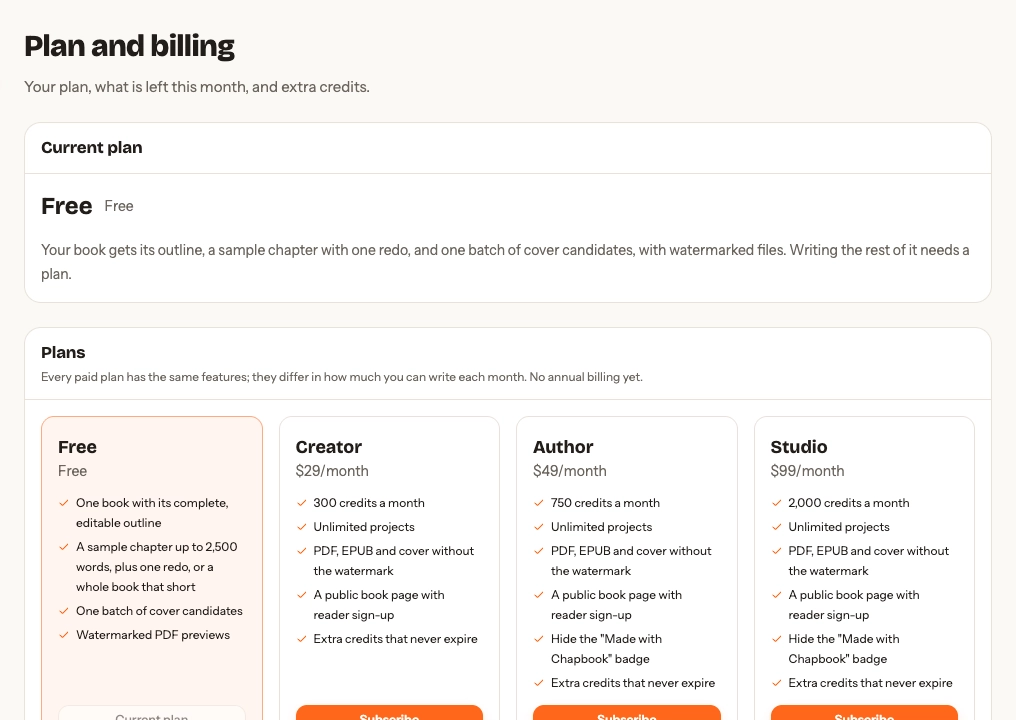
Choose a plan
Creator, Author, and Studio have the same core writing features; they differ in monthly credits, and higher plans can remove the public-page badge. Prices and allowances can change, so use the current plans and prices rather than a number copied into this guide.
Where Billing offers a yearly switch, a plan paid yearly costs less than twelve months of the monthly price. Its credits still arrive every month, on the day of the month the plan started, and expire at the end of that month like any monthly credits.
Change plans
Upgrading takes effect at once. You pay for the difference between the plans over the time left in this period, and once that payment goes through you get the extra credits for the same time: moving up with half the period left adds half the difference between the two plans’ monthly credits. On a yearly plan the credits are for the time left in this month, and later months bring the new plan’s full monthly credits. If the payment doesn’t go through, no credits are added.
Change plans on Billing, where each plan says what it does before you confirm. An upgrade charges your card on file at once.
Moving from monthly to yearly also charges at once: a year of the plan, less the unused part of this month. A new year starts that day, and the credits you have spent this month still count until next month’s arrive.
A downgrade, or moving from yearly to monthly, waits for your next renewal. Nothing is charged or refunded for it, and you keep your plan and its credits until then. Billing shows the change and the date, and Keep cancels it. Upgrading while one is waiting replaces it. If your plan has moved on since the page loaded, Billing shows what is true now and asks you to confirm again.
During a free trial, moving to a higher plan or to yearly ends the trial at once, and your card is charged the new plan’s full price within a few minutes. Its credits arrive once that payment goes through. If it does not go through, files without the watermark and your public page wait for it too.
Billing quotes each charge as an estimate. Polar adds tax on top in some countries, including the US, Canada and India, so the amount on your receipt can be higher.
A plan that is set to cancel, or whose payment failed, changes only after you put that right in Manage subscription.
Know the price before work starts
Every paid action shows its credit estimate before it runs. A writing action reserves credits for the requested length, then returns the difference if the result is shorter. Editing your own text, extracting sources, and rendering watermarked previews are free.
The whole book has a price too. New book shows This book: about N credits, all-in for the kind you pick: the outline, every chapter with the pictures its kind carries, a read-through, a cover, and the launch kit. The plan picker shows the same figure for the book you are in, worked out from its own outline once it has one, and how many books like it each plan’s monthly credits cover. Research, rewrites, and assistant replies come on top. The pricing page lists the figure for every kind of book.
Assistant replies reserve up to five credits per turn, or what remains if you have
less. The final charge follows the actual recorded cost; unused reserved credits
return when the reply ends. One reply per book can run at a time. Verify your email
to receive the free allowance and start using the studio. The free allowance is
one per inbox: another account on the same address, written with dots or a
+tag, does not receive a second one.
Start with a free trial
Some accounts that have never subscribed are offered a free trial of a plan, on Billing and in the plan picker; the button says how many days it lasts. The checkout takes your card, but nothing is charged until the trial’s last day. The trial brings credits of its own, spent first and gone when it ends, and files without the watermark, as on the plan. Two days before the charge, Chapbook emails you a reminder of what will be charged and how to cancel.
To stop it, use Manage subscription on Billing before the last day: you are never charged. The trial’s remaining credits end at once, and everything you made, clean files included, stays yours. If you keep it, the plan’s first payment brings its full monthly credits. Each inbox gets one trial.
Pay once for one book
Where the plan picker offers Just this book, a Book Pass pays once for the book you are in, with no subscription. It brings credits that never expire, spent like a top-up, and for that one book, for good, everything a plan does: writing the rest of it, the polish, the launch kit, files without the watermark, and its public page. The page keeps the “Made with Chapbook” badge. The pass stays with that book; your other books stay on your plan. Billing lists the books a pass covers.
Buy extra credits
Top-ups are available while a paid plan is active. Chapbook spends monthly credits first, then top-ups. Purchased top-up credits do not expire.
Refer another author
Plan and billing has a Give a book card with your referral link, and the card appears beside a book’s files once the book has one. When someone makes an account through your link and first pays for Chapbook, for a plan or extra credits, you each get the credits the card names. They never expire and are spent after your monthly credits, like top-ups. The card counts who joined through your link and who paid.
Two accounts on one inbox, or on the same company domain or its subdomains, are treated as one person and get nothing. If that first payment is refunded inside the refund window, the referral credits neither of you has spent are taken back.
If you recommend Chapbook to an audience, you can apply to be an affiliate: the same link then also earns a cash commission on what the people it brings pay. The affiliate programme page has the terms, the disclosure rules and how to apply.
Manage or cancel
Manage subscription opens the billing portal, where you can cancel, update your card and find your invoices. After cancellation, manuscripts remain editable, generated work stays in the account, existing files remain downloadable, top-ups can still fund AI actions, and watermarked previews remain available.
New clean exports and new top-ups require an active plan; a book with a Book Pass keeps making clean files. Resubscribing restores clean export creation.
A refunded Book Pass returns its unused credits and ends the pass: files already made stay downloadable and a published page stays as it was, but new clean files and page updates need a plan.
Refunds
Within 14 days of a payment you get back what you have not used. A refund can stop unfinished work whose reserved credits were refunded; completed work stays saved. The refund policy explains how that works for plans, renewals, top-ups, and the first payment after a free trial, and how to ask.