All chapters
Set your author profile
Choose what new books inherit: cover name, public identity, voice, and brand look.
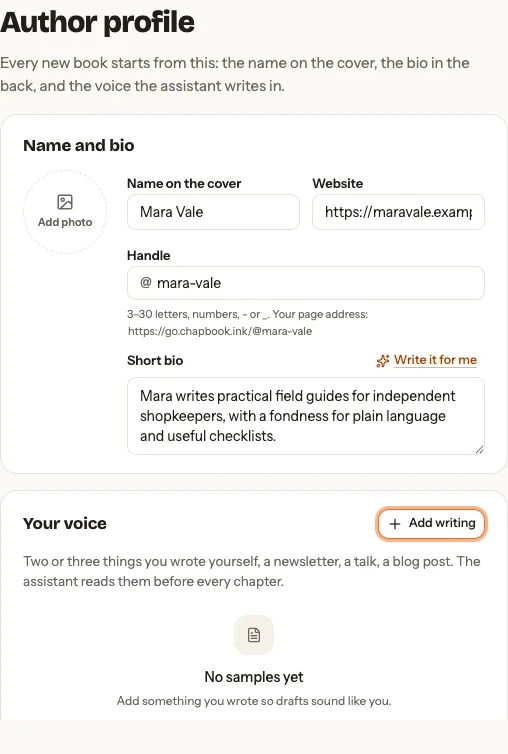
Set your name and public details
Add the name for covers, website, short bio, photo, and the handle used by public book pages. Fields save when you leave them. Write it for me can draft the bio for you to review.
A handle is 3–30 letters, numbers, hyphens, or underscores. Changing it breaks live book-page links, so Chapbook asks you to confirm first.
Teach Chapbook your voice
Add two or three pieces you wrote yourself, then ask Chapbook to read them into a reusable voice profile. Paste text or upload TXT or Markdown. You can keep up to five samples of 20,000 characters each.
Choose re-read after changing the samples. Removing a sample does not silently regenerate the profile.
Use a brand look
A saved brand look can give new books the same heading font, text font, colours, and optional logo. Turn on For new books to apply it automatically. You can upload or remove the logo and remove the saved brand look itself. Existing books keep their own look.
Your feedback
A week after your first clean export or first page sign-up, the Library asks once how Chapbook is working for you: a rating from 1 to 5 and, if you like, a sentence. No thanks closes the question for good. Your answer stays private unless you tick the separate permission box, which lets Chapbook publish your quote on chapbook.ink and in its marketing with the name and role you type. Your answer then appears on your Author profile, where Withdraw permission takes the quote out of Chapbook’s next update of the site.
Account and deleted books
The account card shows your sign-in email and explains that books moved to trash are purged after 30 days. Contact support@chapbook.ink within that window for restoration.
It also holds two email switches. Writing tips covers a welcome, a note when a book’s outline has waited two days with nothing written, and, before you choose a plan, a note the day after chapter one (or a whole short book) is written. Weekly page digest sends Monday’s numbers for your live pages. Each email’s footer link turns its own kind off, and so does your mail app’s unsubscribe button. Sign-in links, password resets, and “your book is ready” notes always arrive.